- REVIEWS
Displays Electronics 
Speakers Sources Other Gear Software - HOW TO
How To Buy How To Use Tech 101

Kaleidescape Cinema One Blu-ray Player/Server Page 2
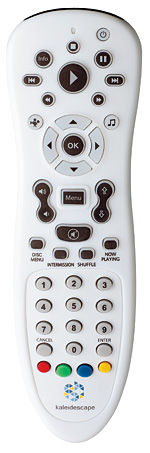
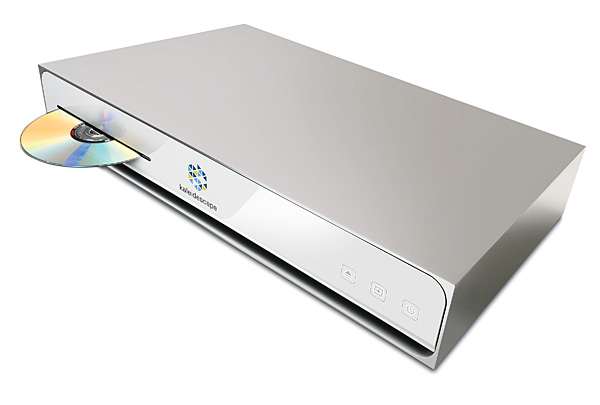
The machine’s video and audio performance, whether from optical disc or a download, is outstanding. The Cinema One passed all our standard benchmark tests (save a largely inconsequential failure on the 2.2 SD test), and real-world movie watching proved it to be a reference-quality player in terms of picture and sound. It’s an excellent music server as well, although it imports music from CDs only. There’s no way to directly transfer high-rez music files from your computer to the Cinema One.
 Kaleidescapement
As much as I’m besotted with the Kaleidescape Experience, there are limitations to the Cinema One that I need to point out. For instance, a genuine movie lover—the type of person who would want a Cinema One—might max out the 4 TB of internal storage sooner than he or she thinks, and there’s no guarantee that there’ll be a future way to add hard-drive space other than buying another Cinema One. Additionally, there’s the unsettling fact that, unlike Kaleidescape’s Premiere servers, the Cinema One doesn’t use a RAID setup. So if the hard drive fails and you can’t recover the data, you’ll need to re-import and/or re-download all of the media you bought from the Kaleidescape Store (the company’s pioneering online bit-identical movie download site).
In theory, you could “virtually” expand the Cinema One’s storage capability by deleting a movie bought from the Kaleidescape Store, thereby making room for a different movie. You can download the deleted movie again from your Store account whenever, in turn, you make room for it. Similarly, you can delete an imported movie and re-import it later. But either scenario will take time—a lot of it. BDs typically take 40 minutes or more to import, and BD movie downloads (usually well over 30 gigabytes) could take hours, depending on your Internet connection speed.
For me, however, the most significant issue I have with the Cinema One is a by-product of Kaleidescape’s squeaky-cleanness when it comes to copyright protection with BDs. Even if you’ve already imported a BD movie to the server’s hard drive, the system requires that you insert the original disc into the Cinema One’s slot to prove that you own the disc before you can watch the movie. (There are no similarly imposed restrictions on DVDs or CDs.) Unfortunately, as the onscreen notice tells you, “Recognizing an inserted disc takes several seconds.” It’s not Kaleidescape’s fault, nor is it some sort of engineering flaw. Kaleidescape is admirably attempting to stay within the law. Unfortunately, having to insert your BDs into the Cinema One each time is like spending four grand on a pony for your daughter and then telling her she can’t ride it on sunny days.
You can avoid this by buying bit-identical BD (and DVD) versions of movies from the Kaleidescape Store and downloading them straight to the Cinema One. With some movies, if you already own the DVD, you can download the HD version for $5.99. Once you’ve done that, the Cinema One knows you own the movie, so there’s no disc (literally!) to load into the player. You can also do a $1.99 upgrade from a Blu-ray Disc you own to an HD download, which similarly eliminates the physical disc.
Excellent as it is, the Kaleidescape Store isn’t the be-all and end-all. Data caps and slow Internet connections can make it impractical or impossible to download those huge HD movies of 30 GB or more. Another aspect to consider is that, since there’s no physical disc, you can’t watch the movie at a friend’s house unless the movie you bought includes an UltraViolet copy. (Interestingly, despite the fact that the Kaleidescape Store promotes and sells movies with such copies, the Cinema One can’t access your UltraViolet account to download UV copies bought elsewhere.)
You can also avoid having to insert BDs by adding a 320-disc Kaleidescape DV700 Disc Vault, which communicates with your Cinema One(s) via your home network. If a certain BD is in the DV700, the Vault automatically authorizes playback, and—voilà!—the full Kaleidescape Experience is yours. Another benefit of the DV700 is that you can load it with all your discs and let it do the tedious work of importing them to the Cinema One unattended, which is wonderful—remember, it can take 40 minutes to import a typical BD. A capacity of 320 discs is a bit of overkill given the drive’s storage capacity, though, even with a dual Cinema One setup, and at $5,495, the DV700 is pricey. (Still, you can save $1,500 by purchasing a DV700/Cinema One bundle for $7,990.)
Conclusion
There is so much to love about Kaleidescape’s Cinema One that it should get my whole-hearted, sell-your-firstborn recommendation—but I have to stop just short of that, solely because having to insert a previously imported BD in order to watch it is infuriating. If the vast majority of your movie collection is on DVDs, you’ll have a great time with the Cinema One. With a large collection of Blu-rays, you’re going to feel cheated each time you feed a BD into the machine—unless you add a DV700 (pricey) or go the more affordable route of upgrading your BDs to HD downloads for $1.99 per disc. That takes it from a great experience to the true Kaleidescape Experience. And it’s an Experience you’ll never forget.
| |||||||||||

| |
| |||||||||







































| Displays Electronics Speakers | |
Sources Other Gear Software | |
Top Picks of the Year Top Picks | |
Custom Install How To Buy How To Use | |
Tech 101
|
|
Latest News Features Blogs | |
Resources Subscriptions |
WHERE TECHNOLOGY BECOMES ENTERTAINMENT
 © 2026 Sound&Vision
AVTech Media Americas Inc., USA
All rights reserved