- REVIEWS
Displays Electronics 
Speakers Sources Other Gear Software - HOW TO
How To Buy How To Use Tech 101

AVR With No Advanced Audio Decoding
Don Sigman
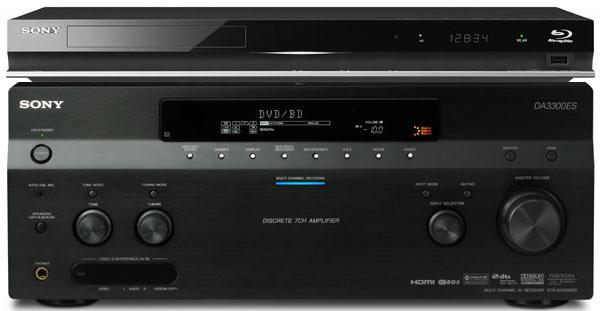
If the receiver cannot decode DTS-HD or Dolby TrueHD bitstreams it receives via HDMI, there are two ways to hear the high-resolution audio, both of which require the player to decode these formats internally. One method is to connect the multichannel analog-audio outputs from the player to the corresponding inputs on the AVR. Unfortunately, the BDP-S570 does not provide these outputs, though the STR-DA3300ES does have multichannel inputs.
The other method is simplerthe player decodes DTS-HD and Dolby TrueHD internally and sends PCM digital audio to the AVR via HDMI. Virtually all AVRs with HDMI inputs can handle PCM audio, so this will work with any player that can decode the high-rez audio formats, including the BDP-S570.
The BDP-S570's Audio Settings menu has a control called Audio (HDMI), which can be set to Auto or PCM. According to the manual, the Auto setting "outputs audio signals according to the status of the connected HDMI device." In other words, the player should detect that the AVR cannot decode DTS-HD and Dolby TrueHD and decode these formats to PCM internally before sending the signal to the AVR. If this doesn't work for some reason, set the control to PCM, which forces the player to decode everything to PCM before sending audio to the AVR via HDMI.
If you have an A/V question, please send it to askhometheater@gmail.com.















































| Displays Electronics Speakers | |
Sources Other Gear Software | |
Top Picks of the Year Top Picks | |
Custom Install How To Buy How To Use | |
Tech 101
|
|
Latest News Features Blogs | |
Resources Subscriptions |
WHERE TECHNOLOGY BECOMES ENTERTAINMENT
 © 2026 Sound&Vision
AVTech Media Americas Inc., USA
All rights reserved