- REVIEWS
Displays Electronics 
Speakers Sources Other Gear Software - HOW TO
How To Buy How To Use Tech 101

3D Broadcast Formats

One of the biggest problems faced by broadcasters is how to fit a 3D datastreamwhich includes two complete imagesinto the same bandwidth occupied by a single-image 2D stream. The answer is simple, if somewhat disquietingsplit the available resolution between the left and right images, giving each of them half the resolution of a 2D image.
There are basically three ways to do this, all of which fall under the moniker frame-compatible spatial compression. The process involves two stepspixel sub-sampling or filtering (determines which pixels are used to represent the left and right images) and frame packing (determines how the left and right pixels are organized in the transmitted frame).

Courtesy Insight Media
One sub-sampling technique uses alternating rows of pixels to represent the left and right images, which resembles interlacing. Once the image is sampled, the pixels are "packed" so the left image occupies the top half of the pixel array and the right image occupies the bottom half; thus, this format is called top-bottom or over-under.
In this case, the vertical resolution of each image is cut in half. Over-under works well for 720p or 1080p signals, but not for 1080i signals, because removing rows in an interlaced signal results in more artifacts. And since most HDTV is broadcast at 1080i, this format is not likely to be used for 3D programs.
Courtesy Insight Media
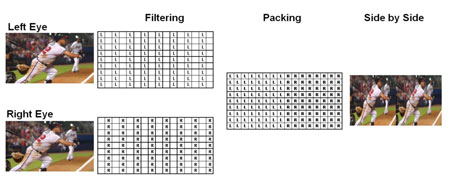
Another approach is to use alternating columns of pixels to represent the left and right images and then pack the left pixels in the left half of the frame and the right pixels in the right half. This format is called, appropriately enough, side-by-side. In this case, the horizontal resolution of each image is cut in half, and there are fewer artifacts than over-under with interlaced signals, so it will be used by most 3D broadcasts, including the World Cup.
Courtesy Insight Media
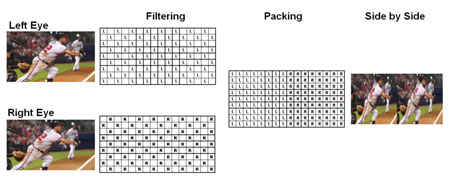
The third option is to represent the left and right images with pixels in a checkerboard pattern, which is called checkerboard or quincunx sub-sampling. (A weird word, I know, but there it is.) The pixels are then packed side-by-side or over-under for transmission.
Checkerboard compression can exhibit more artifacts than either of the other two formats, at least without enhancement metadata as supplied by codecs from companies such as Sensio, Dolby, and RealD. If a TV doesn't include the corresponding decoder, any enhancement metadata is ignored and artifacts abound, which is why the checkerboard format is not likely to be used in 3D broadcasting.
Interestingly, checkerboard-sampled data can be sent directly to a 3D DLP display without side-by-side or over-under packing. In fact, Mitsubishi's new 3D adaptor accepts any of the other formats and converts it to checkerboard before sending it to the company's 3D RPTVs.
Whichever format is used to broadcast the 3D image, your TV must understand it and "unpack" the data in order to display both images separated by what is called the interocular distance, which more or less matches the distance between your eyes. And because 3D TVs display the images in a frame-sequential mannerthat is, the left and right images are displayed alternately with active shutter glassesthey must also reconstruct the pixels missing from each image in the broadcast signal.
From the few 3D broadcasts I've seen so far, it's not as good as Blu-ray 3D, which sends the left and right images each with full resolution and no pixel interpolation. In the 3D broadcasts I've seen, there seems to be more motion blur and stuttering than Blu-ray 3D exhibits, and the image doesn't "hang together" quite as well. Of course, this could be due to factors other than the frame-compatible formats that must be used to accommodate the existing broadcast infrastructure, and I hope to get a 3D-broadcast source in the studio very soon so I can spend more time with it.




























| Displays Electronics Speakers | |
Sources Other Gear Software | |
Top Picks of the Year Top Picks | |
Custom Install How To Buy How To Use | |
Tech 101
|
|
Latest News Features Blogs | |
Resources Subscriptions |
WHERE TECHNOLOGY BECOMES ENTERTAINMENT
 © 2026 Sound&Vision
AVTech Media Americas Inc., USA
All rights reserved