- REVIEWS
Displays Electronics 
Speakers Sources Other Gear Software - HOW TO
How To Buy How To Use Tech 101

LATEST ADDITIONS

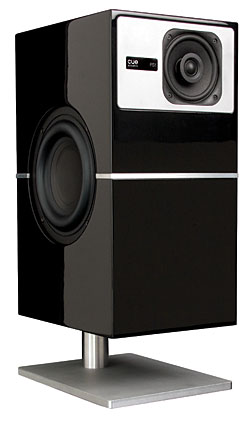 Simple, modern, elegant—the PS1 from Cue Acoustics is definitely not your father’s speaker. Think of it as a forward-looking system for discriminating listeners who crave a simple setup that’s free of wires, hulking speakers, and an ugly stack of components (like the ones collecting dust in the back of your den). Promising big sound and a vivid soundstage, the PS1 system is extremely compact and provides everything you need to pump up the volume except an audio source: a pair of speakers, each with its own built-in 150-watt digital amplifier/processor, and a wireless transmitter that streams uncompressed audio from your TV, PC, smartphone, tablet, you-name-it, to wherever you decide to put the speakers (which, by the way, must be plugged into an AC outlet). Want to grab your tablet and play impromptu DJ at a party? As long as the tablet supports the DLNA connection standard, you can stream audio wirelessly to the PS1’s iPhone-size transmitter, which runs it through a signal processor and sends it to the speakers; otherwise, you can go old school and plug a cable into the transmitter’s digital (optical S/PDIF) or analog (3.5mm stereo) input.


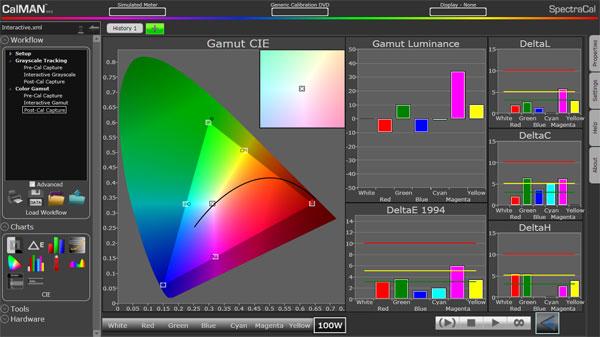
This typically gets you relatively close to the display's best performance, but to get even closer, you must calibrate the display's grayscale and color gamut if the necessary controls are available in the menu system. You can hire a professional to perform the calibration at a cost of several hundred dollars, or you can do it yourself if you have the required equipment, software, and training, which can cost thousands of dollars. But for those of us who want to wring every last drop of performance from our displays, it's money well spent.
Have you had your display's grayscale and color gamut fully calibrated? If so, did you hire a pro to do it, or did you do it yourself? If not, why not?
Vote to see the results and leave a comment about your choice.


Pages







| Displays Electronics Speakers | |
Sources Other Gear Software | |
Top Picks of the Year Top Picks | |
Custom Install How To Buy How To Use | |
Tech 101
|
|
Latest News Features Blogs | |
Resources Subscriptions |
WHERE TECHNOLOGY BECOMES ENTERTAINMENT
 © 2026 Sound&Vision
AVTech Media Americas Inc., USA
All rights reserved